/cover.jpg)
It's the week before finals, you've got four hundred pages of lecture slides you barely remember opening, and you're staring at an app store full of study tools that all promise the same thing. Which one is actually worth your time?
That's the question this guide answers. I've spent the last few months building a study app and testing the others hands-on — uploading real course materials, generating study sets, and seeing which ones hold up when you're actually trying to learn something hard under a deadline. What follows isn't a feature dump. It's seven study apps that each do one job genuinely well, matched to the specific thing that's slowing you down: understanding the material, remembering it, or just getting through the pile.
A quick note on trust before we start: one of the apps below, Neuronity, is my own. I've kept it on this list because it earns a place, but I've been just as honest about what it doesn't do well — and about where the other six beat it. Pricing and features were verified against each vendor's site in July 2026; prices change often, so double-check before subscribing.
The short answer: The best study app for college students depends on your bottleneck. If your challenge is understanding dense readings, NotebookLM is the best free pick — it answers questions about your own documents with a citation on every claim. If you'd rather an AI tutor turn your notes and slides into a structured, sectioned lesson and walk you through it, Neuronity is the strongest free option. For multimedia-heavy classes, StudyFetch and Mindgrasp lead. For pure flashcards, Quizlet and Knowt. For long-term retention, Anki. The full breakdown is below.
Quick comparison: best study apps at a glance
| App | Best for | Free tier | Starting paid price |
|---|---|---|---|
| NotebookLM | Questioning your own documents, with citations | Yes — free | Free (Google account) |
| Neuronity | An AI tutor that builds a guided lesson from your own materials | Yes — core tutor is free | Affordable plan removes daily limits |
| StudyFetch | Multimedia classes (video, audio, lecture recordings) | Limited (2 uploads) | ~$4.99/mo billed annually |
| Mindgrasp | Fast notes and summaries from mixed file types | Limited trial | ~$5.99/mo billed annually |
| Quizlet | Pre-made flashcard sets and quick memorization | Yes (study existing sets) | Quizlet Plus ~$7.99/mo |
| Knowt | A generous free flashcard tier / Quizlet alternative | Yes — generous | Paid tier for unlimited AI |
| Anki | Long-term retention via spaced repetition | Yes — free (desktop) | Free; iOS app is paid |
Prices verified July 2026 and subject to change.
1. NotebookLM — best free tool for questioning your own documents
Best for: Comprehension before recall — when your bottleneck is understanding dense readings, not drilling flashcards.
NotebookLM is Google's free research-and-study tool. You upload your documents and it becomes an interactive assistant grounded in only those sources, answering questions with a citation on every answer — which directly addresses the "can I trust this?" problem with generic chatbots. It's excellent for deep reading and research, less focused on flashcards and spaced review.
/Screenshot%202026-07-13%20191936.png)
Pros
- Free.
- Every answer cites the source passage, so you can verify it.
- Strong for summarizing and interrogating your own readings.
Cons
- Not built for flashcards, quizzes, or spaced repetition.
- It's a research companion, not a structured tutor that teaches you a topic step by step.
Pricing: Free with a Google account.
2. Neuronity — best free AI tutor built around your own materials
Best for: Students who don't just want an answer or a flashcard, but want to actually learn a topic in a structured way — from their own notes, slides, or a goal they type in.
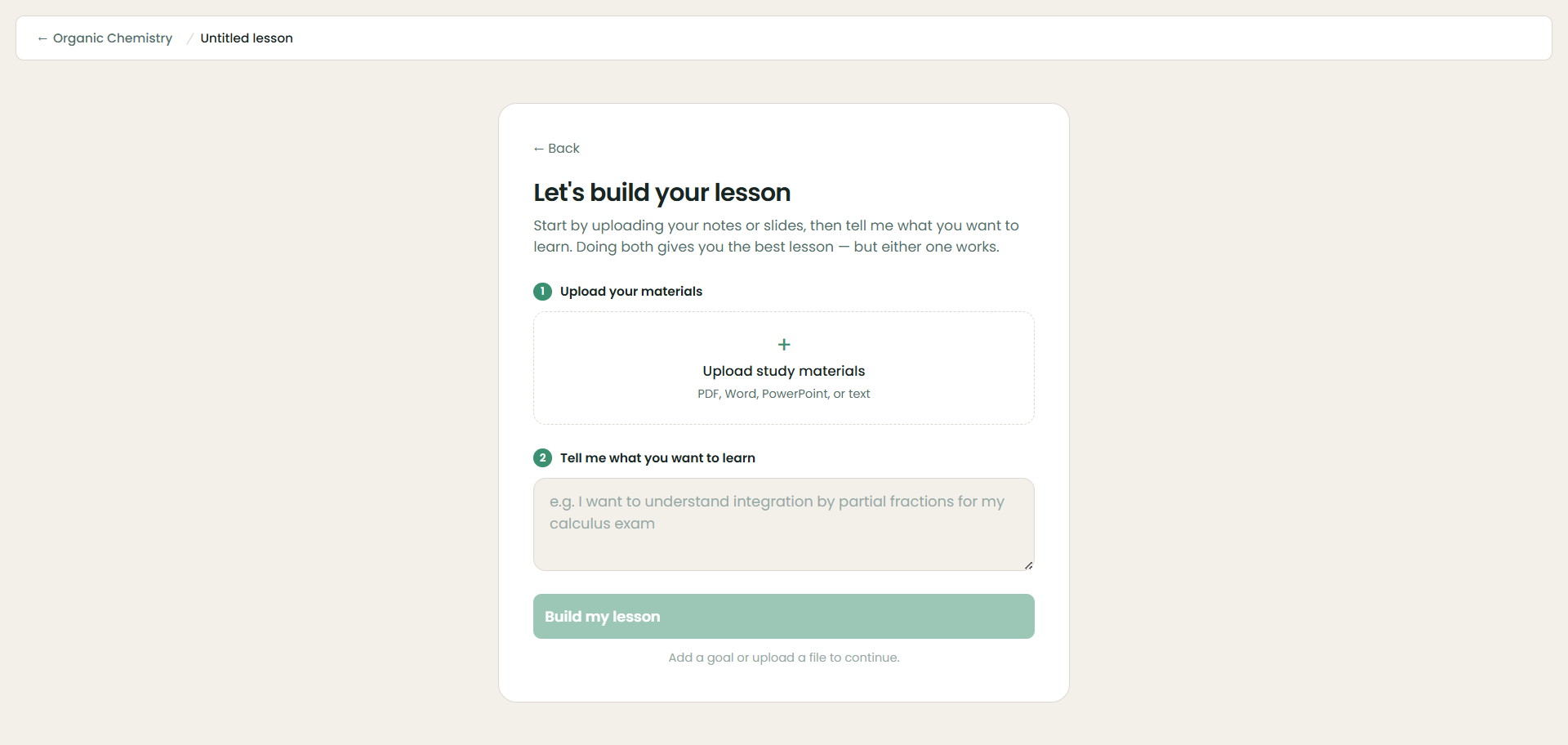
Most study apps in 2026 do the same three things: summarize a PDF, spit out flashcards, and generate a quiz. Neuronity takes a different angle. You create a course, upload your materials (PDF, Word, PowerPoint, or plain text) or just tell it what you want to learn, and it organizes everything into a sectioned lesson plan — essentially a study guide it then teaches you through, one section at a time.
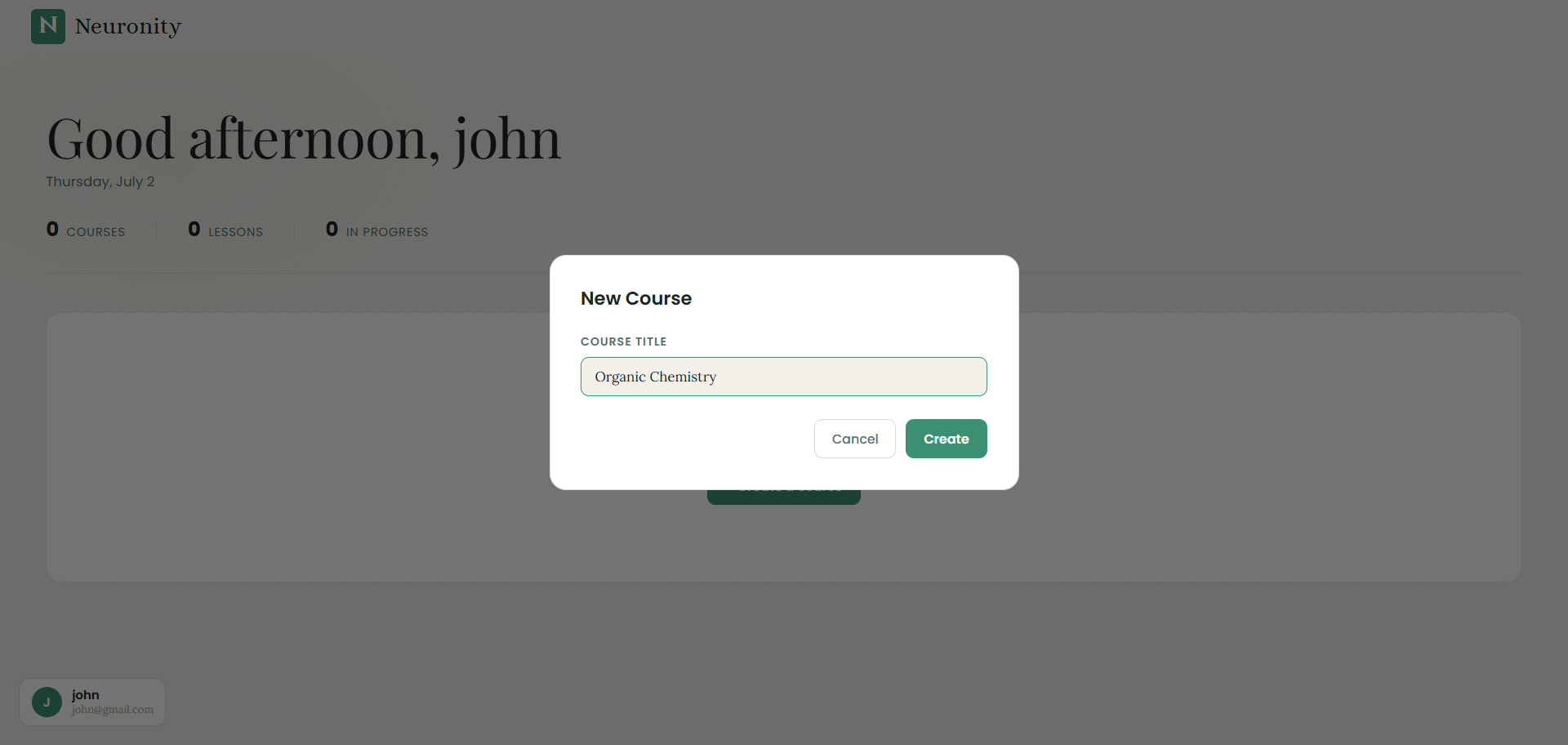
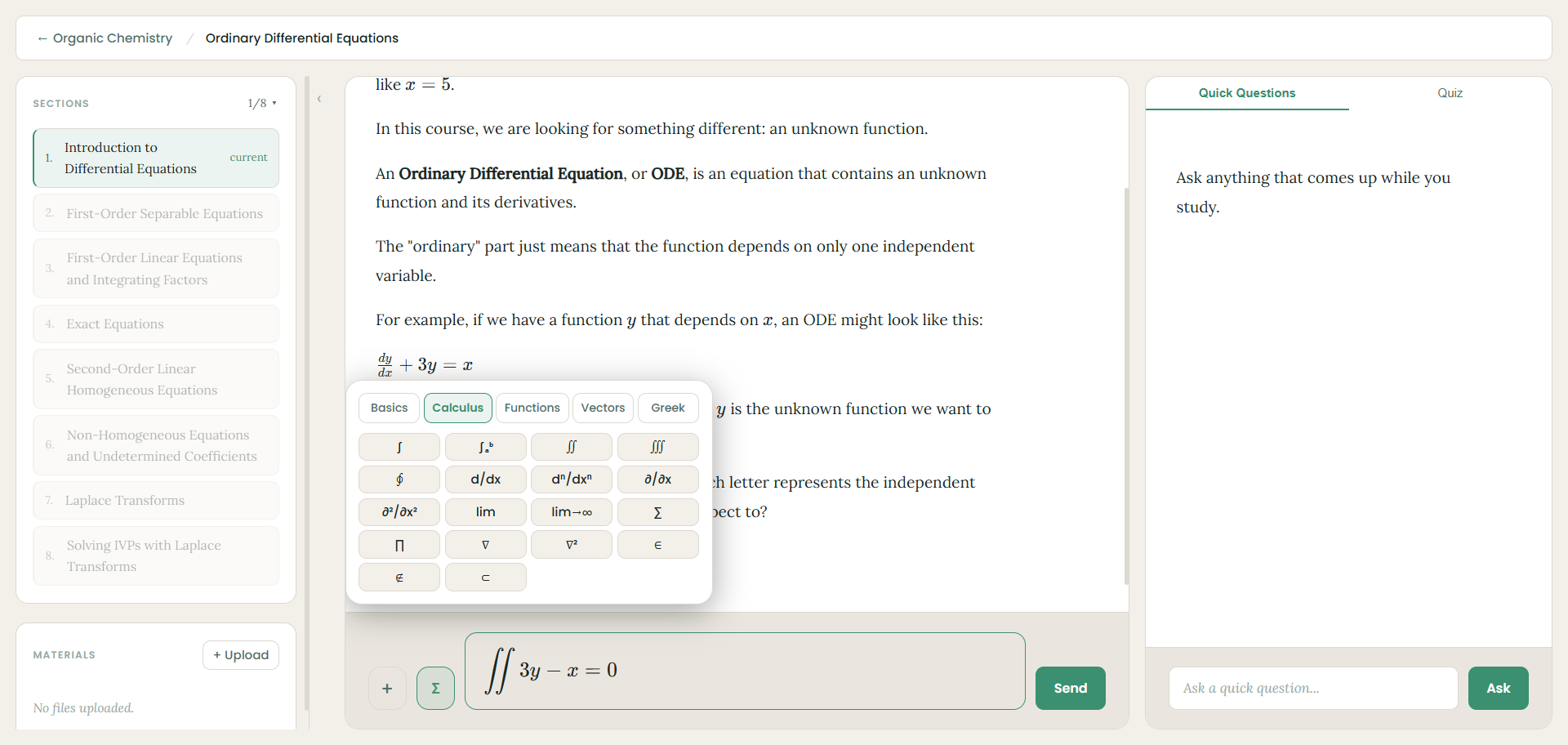
That sectioned structure is the part worth paying attention to. Instead of dropping you into a chat window, the tutor moves through the plan in order, explaining each idea in plain language and checking your understanding as it goes — so you're never just staring at a wall of text. Along the way you hit checkpoints with practice problems to lock in what you learned, and if something isn't clicking, a Quick Questions side panel lets you ask without losing your place in the lesson. If you want to see the whole flow end to end, our 3-minute setup walkthrough shows it step by step.
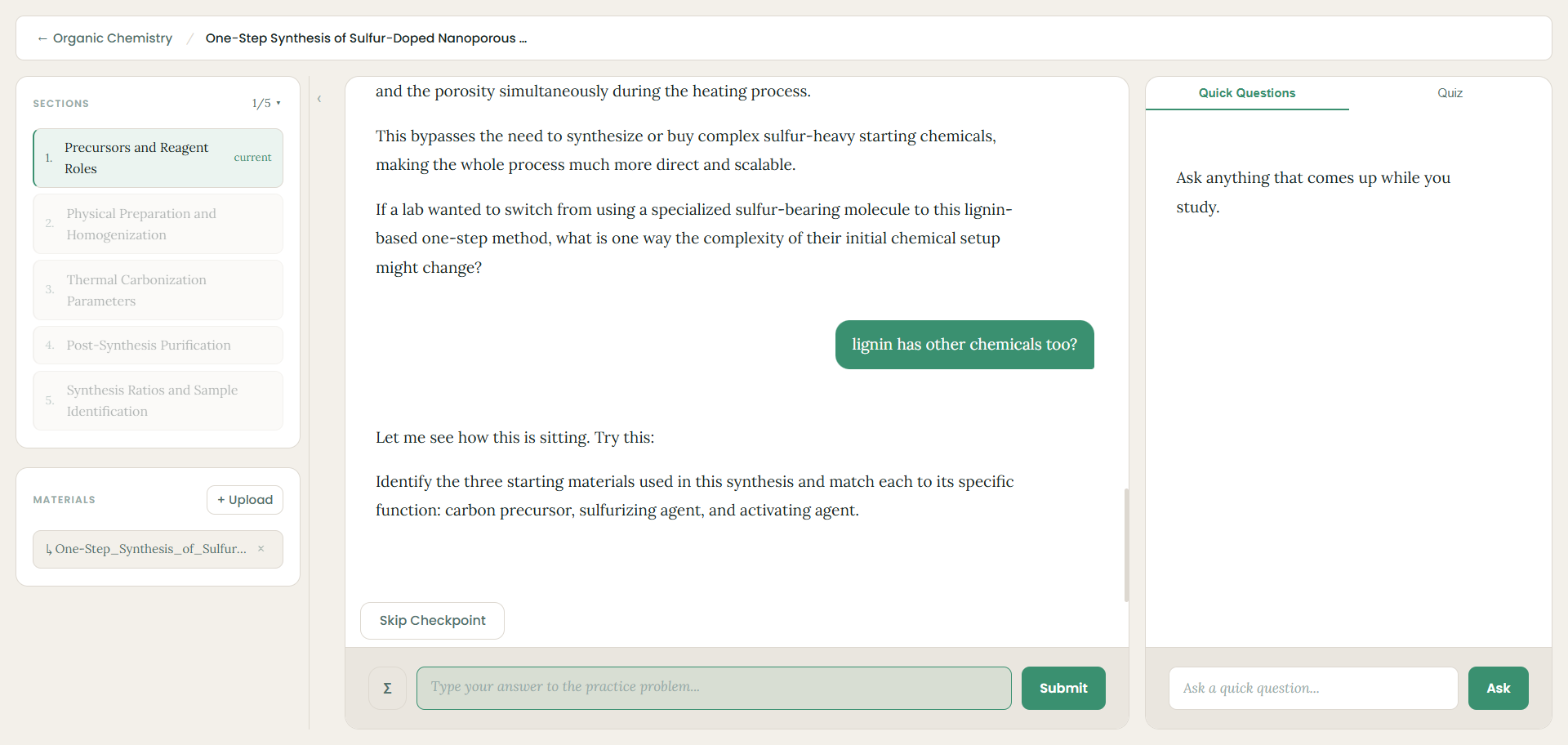
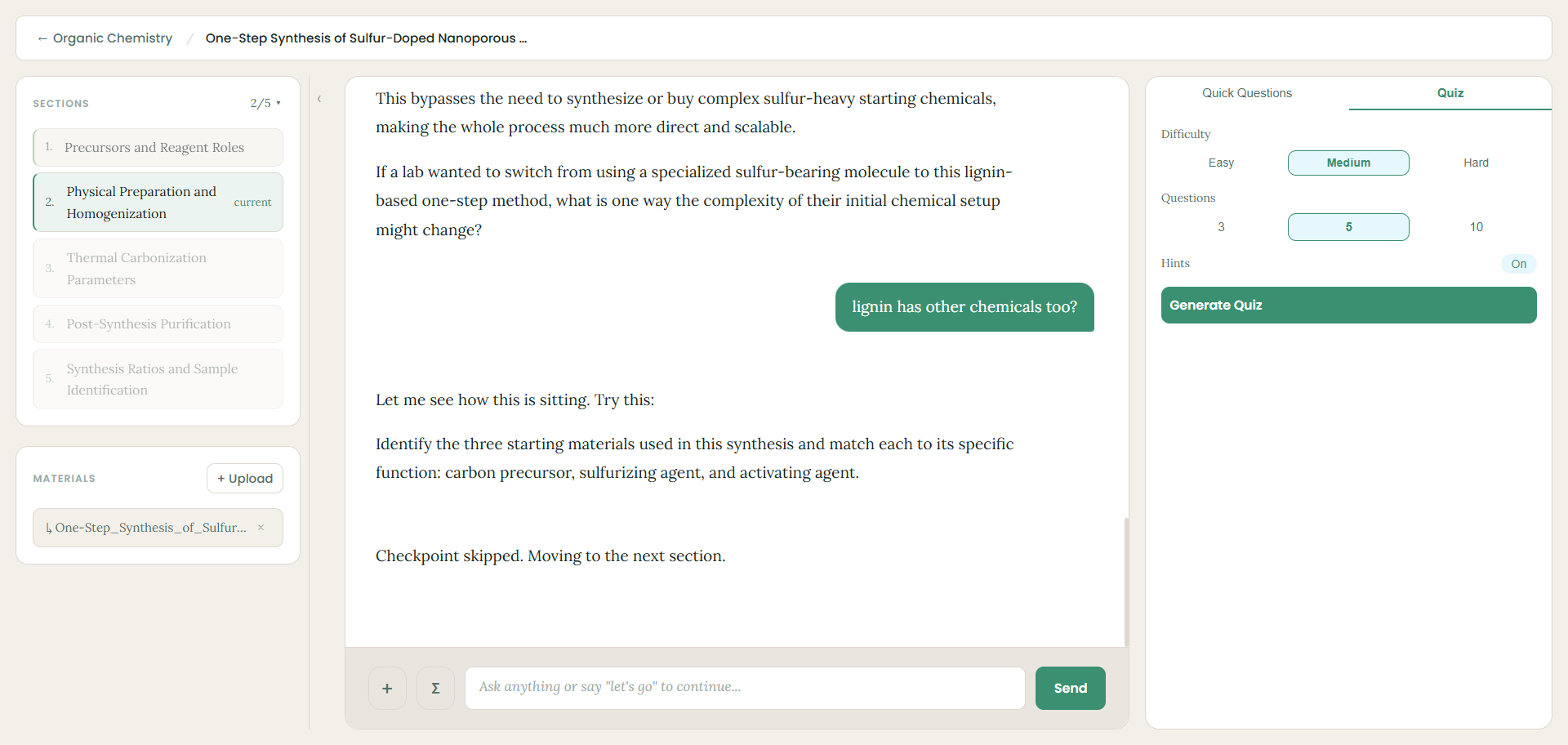
When you're ready to test yourself, you switch to the Quiz tab, pick a difficulty level and number of questions, and generate a quiz to see what stuck. For STEM students there's a genuinely useful touch most competitors lack: a built-in scientific keypad (with Basics, Calculus, Functions, Vectors, and Greek tabs) so you can type integrals, derivatives, and other notation directly into your answers instead of hunting for symbols.
Pros
- Genuinely free core tutor — no credit card to start.
- Builds a structured, guided lesson from your uploaded materials rather than generic content.
- The section-by-section teaching plus checkpoints keeps you actively learning, not passively reading.
- Quick Questions panel answers side questions without breaking your flow.
- Built-in scientific keypad is a real advantage for math, physics, and engineering.
Cons
- Newer and smaller than established names, so it doesn't have a giant community library of pre-made content the way Quizlet does.
- No spaced-repetition scheduling engine like Anki's (yet) — it's built around guided learning and practice rather than long-horizon review.
- Heavy daily users may hit free-tier limits and want the paid plan.
Pricing: Core tutor, homework help, and course creation are free. An affordable paid plan removes daily limits for heavy users. Try Neuronity free
3. StudyFetch — best for multimedia and lecture-heavy classes
Best for: Students whose courses live in video, audio, and recorded lectures.
StudyFetch turns your own course materials into interactive study tools. You can upload a PDF, PowerPoint, lecture recording, YouTube video, or even a photo of handwritten notes, and it generates flashcards, quizzes, summaries, and study guides, plus an AI tutor called Spark.E that answers questions about your specific content. It's aimed squarely at college students and has grown quickly — the company reports several million users, and it raised an $11.5M Series A in 2025.
/Screenshot%202026-07-13%20191725.png)
Pros
- Handles the widest range of input types, including live lecture recording and audio.
- Spark.E tutor answers questions grounded in your uploads.
- All-in-one: one upload gives you flashcards, quizzes, summaries, and a tutor.
Cons
- The free tier is genuinely restrictive (around two uploads), so you can't fully evaluate it for free.
- The most common complaint across review sites is auto-renewal and cancellation friction — set a cancellation reminder the moment you subscribe.
Pricing: Free tier is limited. Annual plans work out to roughly $4.99/mo (Base) or $7.99/mo (Premium); monthly is higher.
4. Mindgrasp — best for fast notes and summaries
Best for: Students buried in mixed-format material who need first-pass notes now.
Mindgrasp takes lectures, YouTube videos, PDFs, and audio recordings and generates notes, summaries, flashcards, and quizzes fast — you can process a one-hour lecture in minutes. Its strength is speed and the breadth of input types it accepts, and it has some real accessibility differentiators (ADHD/dyslexia support, 20+ languages, Canvas/Blackboard integration).
/Screenshot%202026-07-13%20191759.png)
Pros
- Very fast note and summary generation.
- Supports more media types than most, including audio and Zoom recordings.
- Accessibility features and LMS integrations are real differentiators.
Cons
- Summaries are useful but lean passive — you'll want to pair it with active-recall practice.
- The free version is very limited; it's really a paid tool after the trial.
Pricing: Limited free trial; around $5.99/mo billed annually.
5. Quizlet — best for pre-made flashcards and quick memorization
Best for: Vocabulary, definitions, formulas, and quick pre-exam review — especially when someone in your class has already made a deck.
Quizlet practically invented online flashcards and still has the largest community library anywhere (hundreds of millions of sets). For memorization-heavy courses, the odds are good that a solid deck for your exact class already exists. It's polished, familiar, and easy to study with classmates.
/Screenshot%202026-07-13%20191853.png)
Pros
- Unmatched library of pre-made sets — often you don't have to make anything.
- Polished, familiar, strong for group study.
- Practice tests and matching games built in.
Cons
- It doesn't deeply generate study material from your own uploads the way the AI-first tools do.
- Several study modes and ad-free use now sit behind Quizlet Plus.
Pricing: Free to study existing sets; Quizlet Plus around $7.99/mo for AI features and ad-free studying.
6. Knowt — best generous free flashcard tier
Best for: Price-sensitive students who want a free Quizlet alternative with AI features.
Knowt rose to popularity when Quizlet moved its Learn mode behind a paywall. It offers AI-generated flashcards and practice tests from your notes, includes unlimited flashcards on its free tier, and has curated AP exam materials. Study modes include a Kahoot-style game, a Learn mode, matching, and practice tests, plus Quizlet import.
/Screenshot%202026-07-13%20192000.png)
Pros
- One of the most generous free tiers for flashcards.
- Curated AP exam resources.
- Imports existing Quizlet sets.
Cons
- Ads on the free plan interrupt studying.
- The interface can feel less cohesive than the polished paid tools.
Pricing: Generous free tier; paid tier for unlimited AI usage.
7. Anki — best for long-term retention
Best for: Serious, cumulative, high-stakes exams (med school, languages) where you need material to stick for months.
Anki is the gold standard for spaced repetition. Its scheduling algorithm is battle-tested and endlessly customizable, and it's free on desktop and Android. The trade-off is effort: you generally build your own cards, and the learning curve is steep compared to the AI-first tools.
/Screenshot%202026-07-13%20192022.png)
Pros
- The best spaced-repetition algorithm, proven over years.
- Free on desktop; huge ecosystem of add-ons and shared decks.
- Unmatched for long-term memory.
Cons
- Manual card creation and a steep learning curve.
- Dated interface; the iOS app is a one-time paid purchase.
Pricing: Free (desktop/Android); paid iOS app.
How to choose the right study app for you
Don't start by chasing the app with the most features. Start with your actual bottleneck this week:
- "I don't understand the material yet." You need a tutor, not flashcards. Neuronity (guided lessons from your materials) or NotebookLM (questioning your readings) fit here.
- "I understand it but can't remember it." You need active recall and spacing. Anki for the long haul; Quizlet or Knowt for quick decks; Neuronity's checkpoints and quizzes for practice as you learn.
- "I'm drowning in lectures and readings." You need fast ingestion. StudyFetch or Mindgrasp turn hours of material into notes quickly.
- "I'm on a budget." Neuronity, NotebookLM, Knowt, and Anki all have genuinely usable free options.
The best study app is the one that matches how you learn and the specific job slowing you down — not the longest feature list.
Frequently asked questions
What is the best study app for college students?
There's no single winner — it depends on your bottleneck. For learning new material in a structured way from your own notes, Neuronity is the strongest free option. For multimedia-heavy classes, StudyFetch or Mindgrasp. For memorization, Quizlet or Knowt. For long-term retention, Anki. For interrogating your own readings, NotebookLM.
Are these study apps free?
Several are genuinely free to use: Neuronity's core tutor, NotebookLM, Anki (desktop), and Knowt's flashcard tier all work without paying. StudyFetch and Mindgrasp have limited free tiers that mostly serve as trials, and Quizlet is free to study existing sets but charges for AI features.
How do I make a study guide with AI?
Upload your notes, slides, or a textbook chapter to a tool that generates structured material from your own content. In Neuronity, for example, you create a course, add your materials, and it organizes everything into a sectioned lesson plan that functions as a study guide and then teaches you through it, with checkpoints and quizzes to test yourself — our guide to using Neuronity walks through the whole process. Tools like StudyFetch and Mindgrasp will also generate summaries and study guides from uploads.
Is using AI to study cheating?
Using AI to do your assignment for you — writing the essay, producing answers you submit as your own — is plagiarism and against most academic-integrity policies. Using AI to help you learn — explaining concepts, generating practice questions, quizzing you, turning your notes into a study guide — is a legitimate study strategy, the same way a tutor or a study group is. The line is whether you're doing the cognitive work or outsourcing it. The tools above are most valuable when they make you practice, not when they hand you answers.
Which study app is best for STEM?
For math, physics, and engineering, look for step-by-step explanations and easy notation entry. Neuronity includes a built-in scientific keypad for typing calculus and other notation directly into answers, which most study apps lack. StudyFetch's diagram explanations and Mindgrasp's technical handling are also useful for STEM courses.
About the author: Ashir builds Neuronity and tests study tools hands-on. This guide reflects real use of the apps listed; pricing and features were verified against vendor sites in July 2026 and are subject to change. Where a competitor does a specific job better than Neuronity, we've said so.